 Sup!
Sup!Team and public holidays
Add the days off a whole team or a whole location gets, and import public holidays.
There are two kinds of holiday:
- Team holidays: everyone in the team is off, wherever they're based. For example a hack day or a team offsite.
- Public (location) holidays: everyone based at a location is off, whatever their team.
Each person gets their team's holidays plus their location's.
The Team & public holidays tab
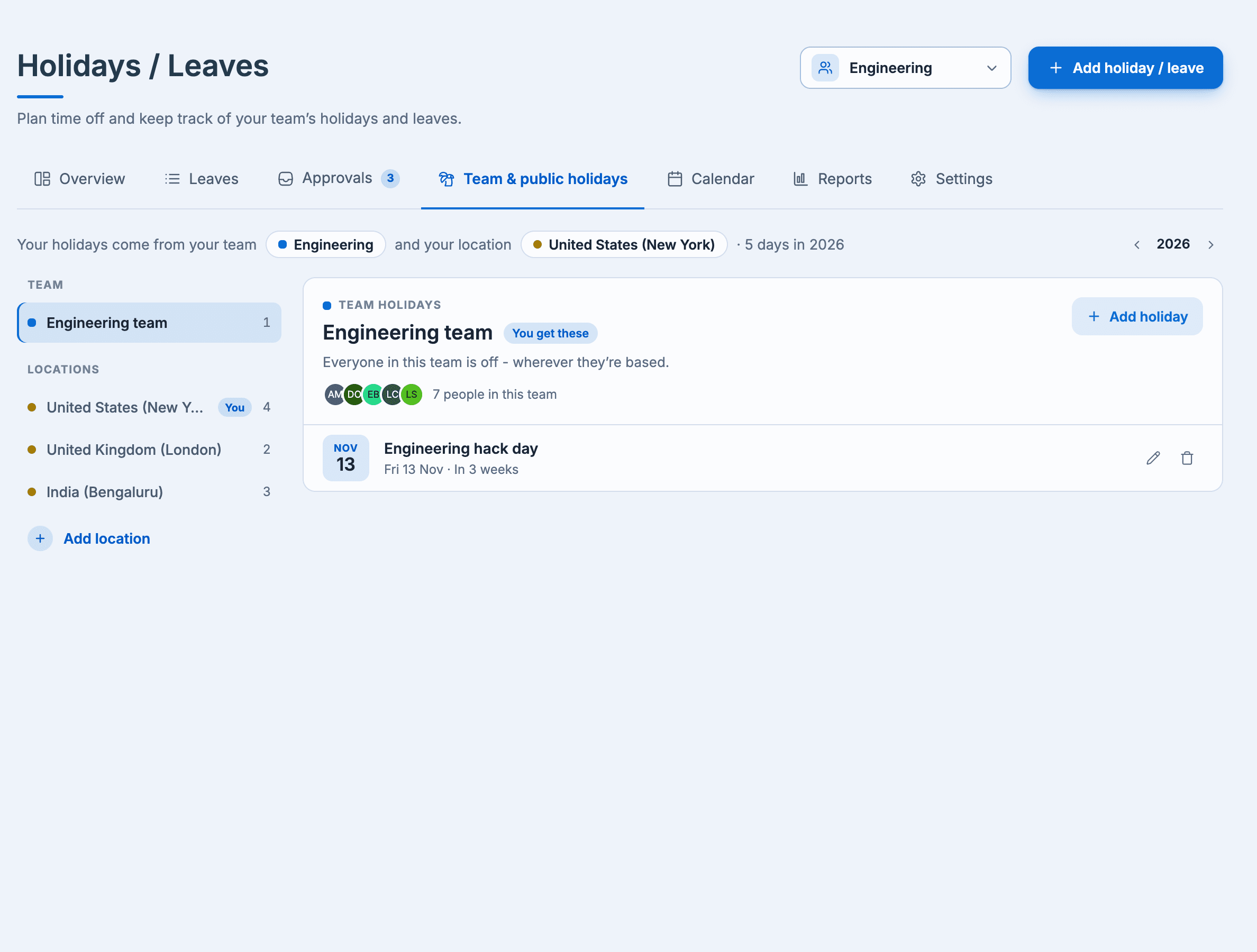
The sentence at the top tells you where your holidays come from and how many days you get this year. Pick the team or a location on the left to see its holidays.
Add holidays
Select Add holiday on the team or location, or Add holiday / leave at the top and then Team or public holiday.
- Under Who gets these days off?, choose A team or A location, then pick which.
- Fill in each Holiday with its Start date, End date and Duration (a full or half day). Use Add holiday for more rows.
- Select Add.
Holidays are approved straight away, and Sup! announces them in the team's channel.
Import public holidays
On a location, select Import public holidays, choose the year, and select Import. Sup! adds that country's public holidays and observances, without announcing each one.
Who can add holidays
Team managers add their team's holidays. Holiday admins add public holidays. Location holidays are a paid feature.
Holidays and follow-ups
On a holiday, follow-ups skip the people who are off.