 Sup!
Sup!Balances and reports
See how much leave people have left, adjust a balance, and export the numbers.
Your balance
On Overview, Your balance shows how many days you have left this year, and how that adds up: Annual allowance, Carried over, Adjusted, Taken, Booked (approved but not taken yet) and Pending. Leave types with their own balance are listed below it. Use the arrows to look at earlier years.
Team balances
Approvers see everyone's balance in Reports > Balances.
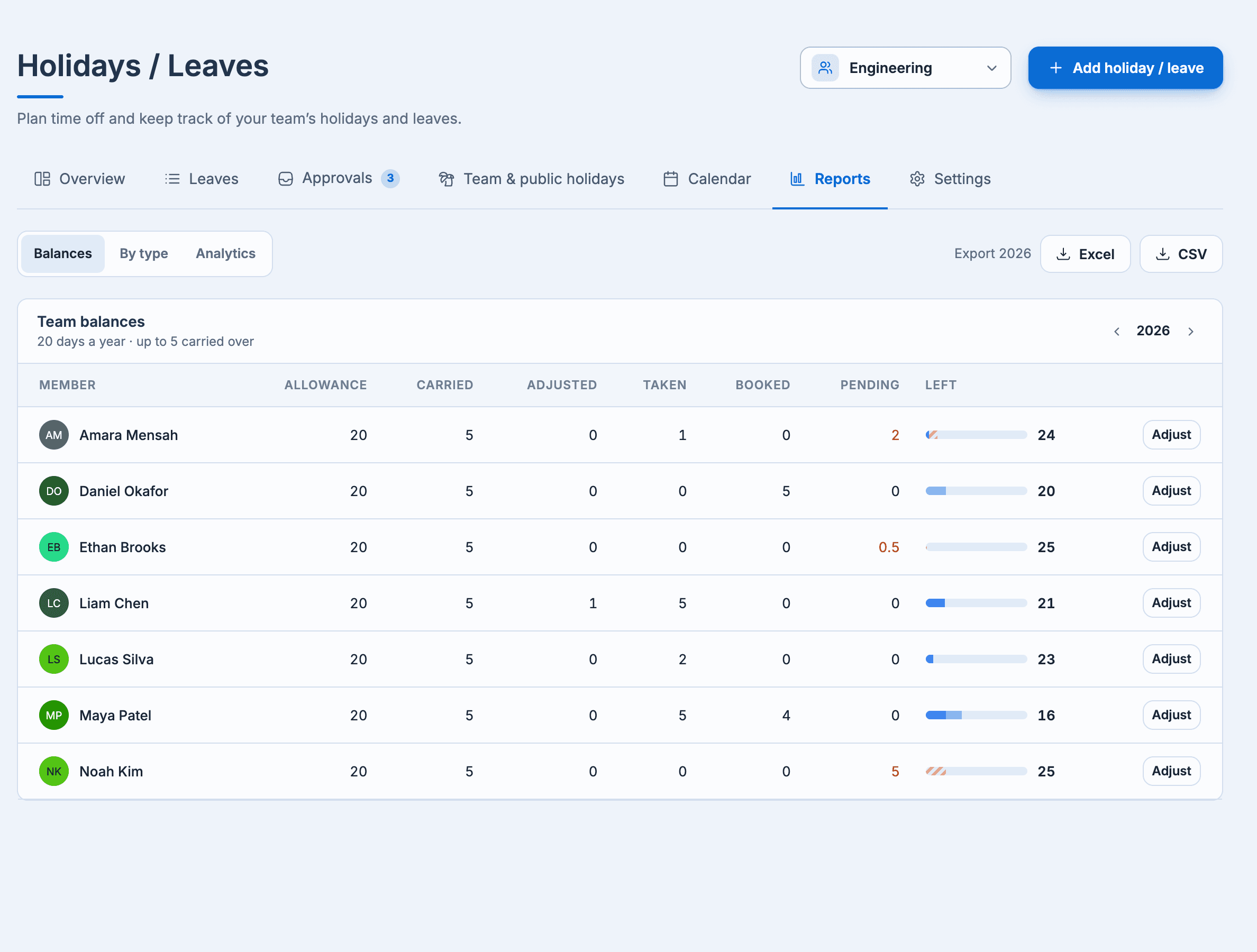
Days left = allowance + carried over + adjustments − taken − booked. Pending requests are shown separately.
Adjust a balance
Select Adjust next to a person (in Reports, Settings > Members, or on their leave's page).
- Allowance per year: give this person a different allowance. Leave it empty to use the team's default.
- Adjustments: add days (for example, for working a weekend) or take them away with a negative number. Add a Note; the person can see it.
Select Save changes.
Leave by type
Reports > By type shows the days taken or booked in the year, by leave type and month, with a table of days per member. Pick a month in the chart to narrow the table.
Export
Approvers can select Export (year) and choose Excel or CSV. The file has one row per member: allowance, carried over, adjustments, taken, booked, pending, remaining, and days for each leave type.
Reports > Analytics has charts of the team's leave on plans that include holiday stats.